Leafette
Collect on one leaf, write on the other.
 Coming soon
 Coming soon
 Coming soon
A journal with two leaves
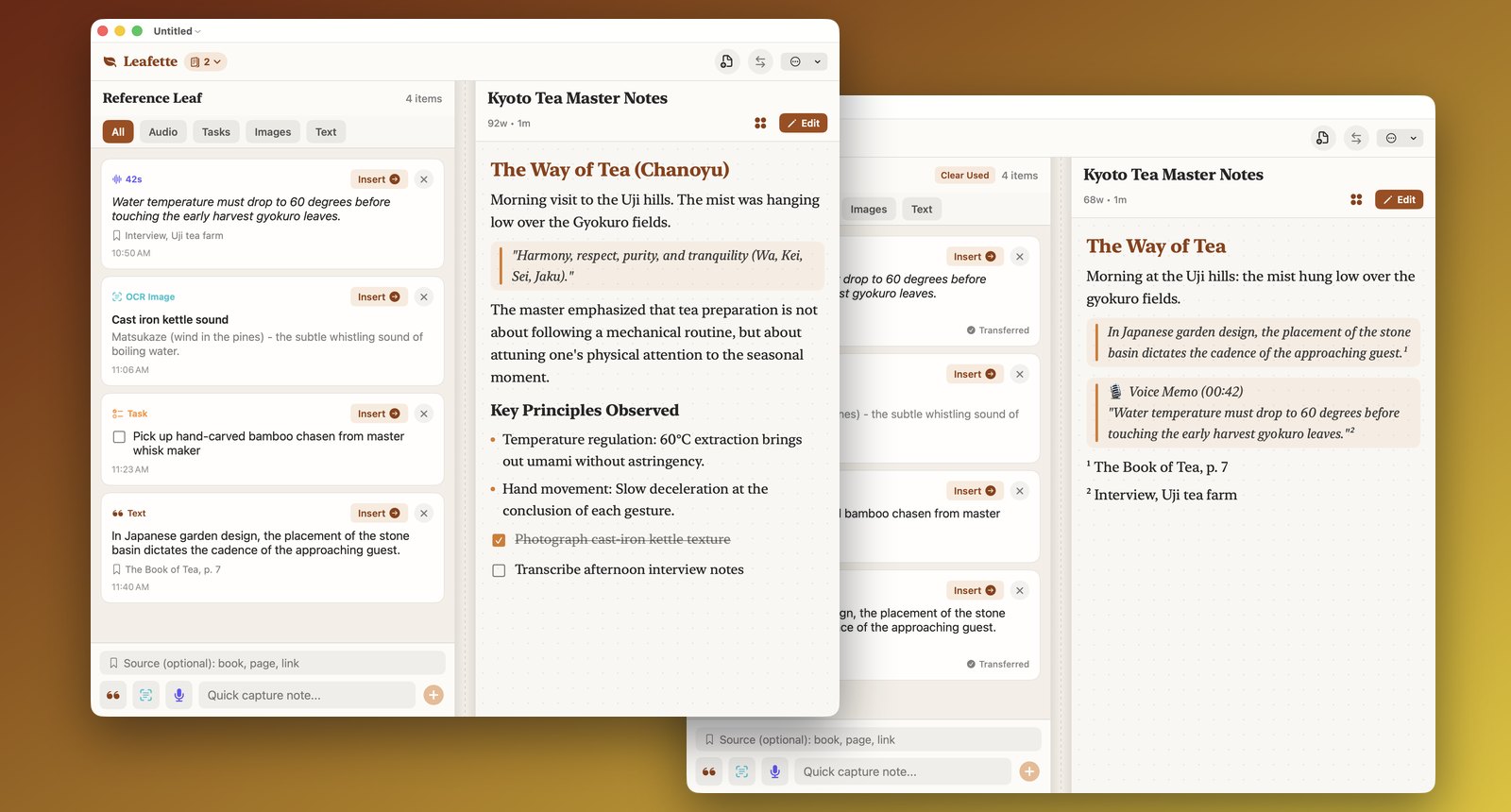
Most note apps give you one scrolling column, so you keep switching between your sources and your draft. Leafette puts a reference leaf beside the page you are writing. Gather quotes, tasks and voice memos on one; write on the other; move things across with one tap.
What it does
- One-tap Insert. Notes, checklist items and voice memos wait in the reference tray. Tap Insert and the Markdown lands on your page. No dragging across screen edges.
- Sources become footnotes. Type where a clipping came from, such as a book and page or a link. When you insert it, Leafette adds a footnote and keeps all your sources together at the foot of the page.
- Voice memos, written on your device. Record a short memo and it becomes text without the network. No audio is kept, only the words.
- Share from anywhere. Choose Share, then Add to Leafette in Safari, Notes or any app. On Mac, select text and use Services, then Add to Leafette. On iPhone and iPad, Shortcuts can add a clipping or start a new leaf.
- Read and write. Switch a page between a clean reading view, with tappable checklists, and a Markdown editor with a formatting bar.
- Your files. On Mac every journal is a document you can save, open and keep. On iPhone, iPad and Android you can save a journal file and add leaves from one. Pages export as plain Markdown.
- Left or right. One tap swaps the two leaves to suit the hand you write with.
- Folding phones. On a dual-screen or foldable device the two leaves follow the fold.
On each device
Mac, iPad, tablets and foldables: both leaves side by side. iPhone and Android phones: the reference shelf sits one tap under your page. Scanning text from a photo (read on the device) is on iPhone, iPad and Mac. Typewriter key sounds and Shortcuts are on iPhone and iPad.
Private in one paragraph
Leafette has no account, no tracking, no analytics and no network access, and the developer collects no data. Your journal, voice memos and scans stay on your device. The full privacy policy is short.
Get it
Leafette is a single purchase on the App Store for iPhone, iPad and Mac, and is on Google Play for Android. Requires iOS 17, macOS 14 or Android 8.0 or later. Voice memos on Android need Android 13 or later with an on-device speech model for your language.
More apps from the same maker
Small apps, each made to do one thing well. No accounts, no ads, and none of them tracks you.
 StatuetteCPU, memory, disk and network in your menu bar.Mac
 TocketteA timer, one drag from the menu bar.MaciPhone & iPadAndroid
 ZonetteEvery time zone you care about, one click away.MaciPhone & iPadAndroid
 LunetteThe Moon and the Sun, at a glance.MaciPhone & iPadAndroid
 LunaretteThe lunar calendar, in four traditions.MaciPhone & iPadAndroid
 PausetteGentle breaks for your eyes and your back.Mac
 PoisetteSit tall, reminded by the AirPods you wear.MaciPhone & iPad
 HushetteCalm ambient sound that never loops.MaciPhone & iPadAndroid
 TapsodyMechanical keyboard sounds as you type.Mac
 ThrumlineYour heart rate, live in the menu bar.MaciPhone & iPadAndroid
 NightjarKeep your Mac awake. Honestly.Mac
 UmbretteDim everything but the window you work in.Mac
 PrompetteA teleprompter right under your camera.MaciPhone & iPadAndroid
 TalletteA paper tape for your sums.MaciPhone & iPadAndroid
 ProbetteEverything technical about a media file, in words.MaciPhone & iPadAndroid
 BindetteTurn audio files into one proper audiobook.MaciPhone & iPadAndroid
 LettretteOpen winmail.dat and .msg files, as they were sent.MaciPhone & iPadAndroid
 Nhanh TayPut four answers in order. Fast.MaciPhone & iPadAndroid
 PinetteNotes you keep in sight.MaciPhone & iPadAndroid
 UsagetteClaude usage limits in your menu bar.Mac
 SquiggoDraw along with a friendly buddy.MaciPhone & iPadAndroid
 ForemanJobs, quotes and invoices for trades.MaciPhone & iPadAndroid
 TilewakeA sliding puzzle whose pictures wake up.MaciPhone & iPadAndroid
 Chăm luyệnVietnamese primary-school practice, read aloud.MaciPhone & iPadAndroid
 SalahPrayer times for the whole family.MaciPhone & iPadAndroid
 KittiwakeAsk the news a question, watch one signal.MaciPhone & iPadAndroid
 ReadetteFree related reading for any article linkMaciPhone & iPadAndroid
 TinkerhallSee how everyday machines work, one part at a time.MaciPhone & iPadAndroid
 SnaplineCall the beam that breaks first.MaciPhone & iPadAndroid